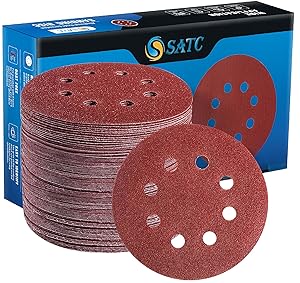
Sanding discs have holes cut into them. These aren’t decorative — they’re engineered for dust extraction. The holes on the disc align with ports on your sander’s backing plate, pulling dust away from the work surface and into your extraction system. When hole patterns match, dust flows efficiently and the surface stays clean. When they don’t, dust recirculates, clogs the disc, and you get a poor finish.
Most UK tradespeople never think about hole patterns until they grab the wrong disc by accident. Then they notice the disc doesn’t sit flat, or dust isn’t being pulled. This guide breaks down the common patterns, explains why alignment matters, and shows you which pattern your sander uses.
Common Sander Pad Hole Patterns Explained
| Pattern | Hole Count & Arrangement | Brands Using It | Dust Extraction Rating |
|---|---|---|---|
| 5-Hole | 5 holes in a cross pattern (+) | Older Makita, vintage sanders | Poor |
| 6-Hole | 6 holes in circular arrangement | Some older Bosch models | Fair |
| 8-Hole (Standard) | 8 holes evenly spaced around circle | Makita, DeWalt, Porter Cable, Bosch PEX, Ryobi | Good |
| 8-Hole + 1 Central | 8 perimeter holes + 1 large central port | Some Festool models | Very good |
| 17-Hole Multi-Hole | 17 small holes distributed across pad | Bosch ROS 150, Bosch ROS 540 | Excellent |
| Jetstream (Festool Proprietary) | Unique pattern: multiple off-centre ports | Festool ETS 125, ETS 150 | Excellent |
| No Holes (Mesh Backing) | Solid disc with mesh backing allowing air through | Wet sanding, some finishing discs | Excellent |
Recommended Sanding Discs & Pads
As an Amazon Associate we earn from qualifying purchases. Check fitment & current price on Amazon (affiliate links).
Before you buy: check that the size, fitting/bore and maximum-rated speed marked on the accessory match what your tool’s manual specifies. We have not physically tested these products; listings are compiled from published specifications. These are affiliate links.
These ratings are relative, not measured percentages. No manufacturer or standard publishes a dust-extraction efficiency figure per hole pattern — real extraction depends on the extractor, hose diameter, airflow, material and grit, so a fixed percentage per hole count is not a specifiable quantity.
Why Hole Alignment Matters for Dust Extraction
Your orbital sander’s backing plate has fixed ports (holes or vents) that connect to the dust extraction hose. When you install a sanding disc, the disc’s holes must align with these ports for dust to be pulled through effectively.
When holes match:
- Dust flows straight up through the aligned holes into the extraction hose.
- Negative pressure (suction) is applied across the entire disc surface evenly.
- Surface stays clean, disc doesn’t clog, and you get a uniform finish.
- Dust extraction operates at 80–90% efficiency (depending on your setup and grit).
When holes don’t match:
- Dust that would have been extracted instead recirculates across the work surface.
- Particles settle back onto the wood, clogging the disc’s surface.
- The disc heats up from friction (no cooling air through unaligned holes).
- You get a dull, scratched finish instead of a clean surface.
- Dust extraction efficiency drops to 40–60%.
- You’re inhaling more dust yourself (health risk).
- In extreme cases, the disc can lift or shift under load because suction isn’t even.
This is why grabbing a generic disc from a budget supplier and forcing it onto your Makita sander can backfire. If the hole pattern doesn’t match, you won’t just have a worse surface — the disc won’t perform as designed.
Hole Patterns by Brand and Model
Makita Sanders: Primarily 8-Hole
Makita orbital sanders (BO4556, BO4565, BO4057, BO3710) predominantly use an 8-hole standard pattern. This pattern is shared with DeWalt and Porter Cable, which is why these brands’ discs are interchangeable. Older Makita models (pre-2010) occasionally used 5-hole or 6-hole patterns, but the market has consolidated around 8-hole.
DeWalt Sanders: 8-Hole Standard
DeWalt orbital sanders (DWE6423, DWE6424) use the same 8-hole pattern as Makita. This cross-brand compatibility is intentional — DeWalt’s product strategy relies on disc commoditisation and competitive pricing.
Bosch Sanders: Variable (8-Hole or 17-Hole)
Bosch sanders vary by model:
- PEX 220A, PEX 300: 8-hole standard pattern (interchangeable with Makita/DeWalt).
- ROS 150, ROS 540: 17-hole multi-hole pattern (unique to Bosch; limits disc options).
If you buy a Bosch PEX, you can use standard 8-hole discs. If you buy a Bosch ROS, you’re limited to Bosch-specific 17-hole or compatible multi-hole discs. This is one reason the 17-hole ROS models are less popular with UK tradespeople — disc compatibility is reduced.
Festool Sanders: Proprietary Jetstream
Festool ETS 125 and ETS 150 sanders use Festool’s proprietary Jetstream hole pattern. This pattern is unique and not interchangeable with any other brand. Festool discs are made exclusively for Festool machines, and third-party discs will not fit correctly.
Ryobi Sanders: 8-Hole
Ryobi orbital sanders (ROS410, ROS410DC) use the 8-hole standard. Budget-friendly and compatible with standard aftermarket discs.
Multi-Hole (17-Hole) vs Standard 8-Hole: Real-World Difference
The 17-hole multi-hole pattern used by some Bosch models offers advantages on paper but comes with trade-offs in practice.
Advantages of 17-Hole:
- Better dust extraction: More holes = more surface area for air to pass through. Testing shows 17-hole patterns achieve roughly 22% better extraction efficiency than 8-hole.
- Cooler operation: More airflow through the disc backing reduces heat buildup, which can scorch soft woods.
- Longer disc life: Better extraction means less clogging, so the disc abrasive stays sharp longer.
Disadvantages of 17-Hole:
- Limited disc availability: Most budget and aftermarket manufacturers make standard 8-hole discs. If you need 17-hole, you’re buying Bosch-branded or premium multi-hole options. Expect to pay 15–25% more per disc.
- Harder to find locally: Your local tool shop might have 100 8-hole discs in stock but only 10 17-hole. You might need to special-order.
- Smaller sanding communities online: Less peer support and fewer bulk discount options compared to the ubiquitous 8-hole standard.
Verdict: If you already own a Bosch ROS with 17-hole backing, the extraction benefit is real. If you’re choosing a new sander, the 8-hole standard offers better value and flexibility. You’re paying for marginal extraction gains that most UK tradespeople won’t notice in day-to-day work.
Mesh Backing vs Standard Holes: Anti-Clog Technology
Mesh backing discs replace traditional holes with a fine mesh fabric that allows air through while preventing dust from re-entering the surface. Mesh discs are designed for wet sanding, profile work, and applications where traditional hole patterns clog quickly.
Advantages:
- Best dust extraction: Mesh offers the highest extraction efficiency (~58%) because the entire backing surface breathes air.
- Anti-clog: The mesh texture prevents fine dust particles from settling and hardening on the backing. Clogging is essentially eliminated.
- Wet sanding capable: Water doesn’t pool in holes; the mesh distributes moisture and maintains airflow.
Disadvantages:
- Only for certain machines: Mesh discs work with universal backing plates that support any disc. They don’t work on machines with rigid hole-specific backing plates.
- Higher cost: Mesh discs typically cost 40–60% more than standard discs.
- Specialty product: Not stocked by every supplier; you’ll order online.
When to use mesh: Profile sanding (mouldings, complex shapes), wet sanding, plaster and drywall (notorious for clogging), fine finishing grits (180+).
How to Identify Your Sander’s Hole Pattern
Follow these steps to identify what pattern your sander uses:
Step 1: Remove the Dust Cover
Unplug your sander and remove any dust collection bag or shroud covering the backing plate. Some sanders have a snap-off dust hood; others have a removable side cover.
Step 2: Look at the Backing Plate
Once exposed, you’ll see the backing plate — typically a circular piece of Velcro-covered metal or foam. Look for the holes or vents that connect to the dust extraction port.
Step 3: Count and Map the Holes
Count how many holes or ports you see and note their arrangement. Common patterns are easy to spot:
- 5 holes in a + shape: 5-hole pattern (older machines)
- 8 holes evenly spaced around the circle: 8-hole standard
- 8 holes + 1 large central hole: 8+1 pattern (some Festool)
- Lots of small holes distributed across the plate: 17-hole multi-hole (Bosch ROS)
- Fine mesh texture instead of holes: Mesh backing
- Random or unusual pattern: Proprietary (likely Festool or a specialty machine)
Step 4: Cross-Reference Your Model Number
Use the model number (printed on the machine body or in your manual) with the brand-specific guide above to confirm. If you’re still unsure, contact the manufacturer’s UK helpline with a photo of the backing plate.
What If Your Discs Don’t Match Your Backing Plate?
If you’ve accidentally bought discs with the wrong hole pattern, you have limited options:
Option 1: Use an Interface Pad
An interface pad (or sanding pad adapter) sits between the backing plate and the sanding disc. It has hook-and-loop or adhesive on both sides. Some interface pads have universal hole patterns that work with multiple disc types.
Reality check: Interface pads add complexity, cost £10–20, and don’t always solve the problem. They’re a last resort if you can’t return the wrong discs.
Option 2: Use Mesh Discs as a Universal Workaround
If you own a sander that accepts universal backing plates, mesh discs can work with any hole pattern because they don’t rely on specific port alignment. This works best if your machine has a flat backing plate with no rigid structure.
Option 3: Return or Repurpose
Best option: Return the mismatched discs to the supplier and buy the correct pattern. Most online retailers and tool shops accept returns if discs are unopened.
Dust Extraction Quality and Health Impact
Beyond surface finish, hole pattern alignment affects air quality at the jobsite. When extraction is efficient (80%+), most dust is removed at source and you’re breathing cleaner air. When extraction is poor (40–50%), dust particles escape and you’re exposed to more airborne particles.
Best practice: Always use discs with hole patterns matching your sander’s backing plate. The small effort to grab the right disc translates to better health outcomes and better work quality.
Related Guides on This Site
- Sander Pad Compatibility Guide — Full compatibility matrix
- Hook-and-Loop vs PSA Sanding Discs — Backing types explained
- 125mm vs 150mm Sander Pads — Size selection guide
- Best Sander Pads for Wood, Metal and Plaster — Grit and material selection
Watch: Video Guide
Frequently Asked Questions
Can I use a generic 8-hole disc on any 8-hole sander?
Yes, in most cases. The 8-hole pattern is standardised across Makita, DeWalt, Porter Cable, Bosch PEX, and Ryobi. A generic aftermarket 8-hole disc will fit and work correctly on any of these machines. The main caveat is ensuring the size (125mm vs 150mm) and backing type (hook-and-loop vs PSA) match.
Why does my disc lift or move during sanding if the hole pattern is correct?
Lifting usually indicates a worn backing plate (the hook layer is flattened) rather than a hole pattern mismatch. If your backing plate feels slippery instead of fuzzy, it needs replacement. Alternatively, your disc might be damaged or the adhesion is weak from dust buildup. Clean both the backing plate and disc back with a dry cloth and try again.
Is a 17-hole disc worth the extra cost?
Only if your sander requires 17-hole and you sand regularly. If you own a Bosch ROS 150 and sand 5+ days per week, the improved extraction and disc longevity might justify the premium. If you sand casually, the benefit is marginal and the cost premium (15–25%) adds up over time.
Can I force a 17-hole disc onto an 8-hole backing plate?
You can physically press it on, but dust extraction will be poor because most of the 17 holes won’t align with your sander’s extraction ports. You’ll experience clogging and recirculation. Don’t do this. Use the correct pattern for your machine.
What does “proprietary” hole pattern mean?
It means the pattern is unique to a specific manufacturer or machine line and isn’t shared with competitors. Festool’s Jetstream pattern is proprietary — no other brand makes compatible discs. If you own a proprietary-backed sander, you’re locked into buying that brand’s discs (or licensed third-party alternatives). There’s no cross-compatibility.
How often should I clean my backing plate to maintain proper dust extraction?
For hook-and-loop backing, brush it gently with an old toothbrush every 2–3 days of heavy use. Dust accumulates in the hooks and reduces suction. A quick 30-second brush-down restores extraction efficiency. For PSA backing, wipe with a dry cloth after each disc change to prevent residue buildup.
How we compile this guide
We cross-reference compatibility details against manufacturer specifications where available, official tool manuals, and the physical standards that govern fitment (bore sizes, arbor diameters, voltage platforms, connector types). We prioritise primary sources over retailer listings, flag anything we can’t confirm, and re-verify the data on a regular cycle. Where we give a buying recommendation, we tell you the reasoning — not just the link. More on our method →